Healthcare is in the middle of a digital shift, and the data management challenges that come with it are real.
The backbone of this shift: EHR integration, interoperability standards (FHIR, HL7), and data governance frameworks.
At the center of it all is Epic Systems, which now holds 55% of the acute care market by hospital beds, according to KLAS research.
Done right, Epic integration eliminates data silos, automates clinical workflows, and compounds in value over time. Done poorly, it becomes one of the most expensive IT headaches a health system will ever face.
Considering the Epic EHR integration? This guide is here to help you land in the first camp.
I'm Anastasiia Kazakova, a project manager with 5+ years of experience at Uptech — a software development company. I'll walk you through what Epic integration actually is, when it makes sense, how the process works, where projects typically break down, and what separates integrations that hold up in production from those that don't.
Let’s get started.

What is Epic EHR integration?
Epic EHR integration is the process of connecting a healthcare application, system, or platform to Epic, a widely used healthcare software platform, to securely exchange patient data in real time.
- When the connection is set up properly, your app can:
- Read patient data from Epic
- Write data back to Epic
- Get notified when something changes
All of this happens in real time, which matters a lot in healthcare. The exchange uses specific rules and languages so that both systems understand each other. The two main ones you'll hear about are HL7 and FHIR.
HL7 is the older standard, still widely used in hospitals today. It works like a notification system: Epic sends your app a message the moment something happens, like a patient being admitted or a lab result coming in.
FHIR is the modern standard and where the industry is heading. Your app can request exactly the data it needs and get it back in a clean, predictable format. It's now required by U.S. law for all EHR systems, including Epic.
What Are The Pros and Cons of Epic EHR Integration?
Epic EHR Integration requires significant time, effort, and cost, but it also offers a range of important benefits.
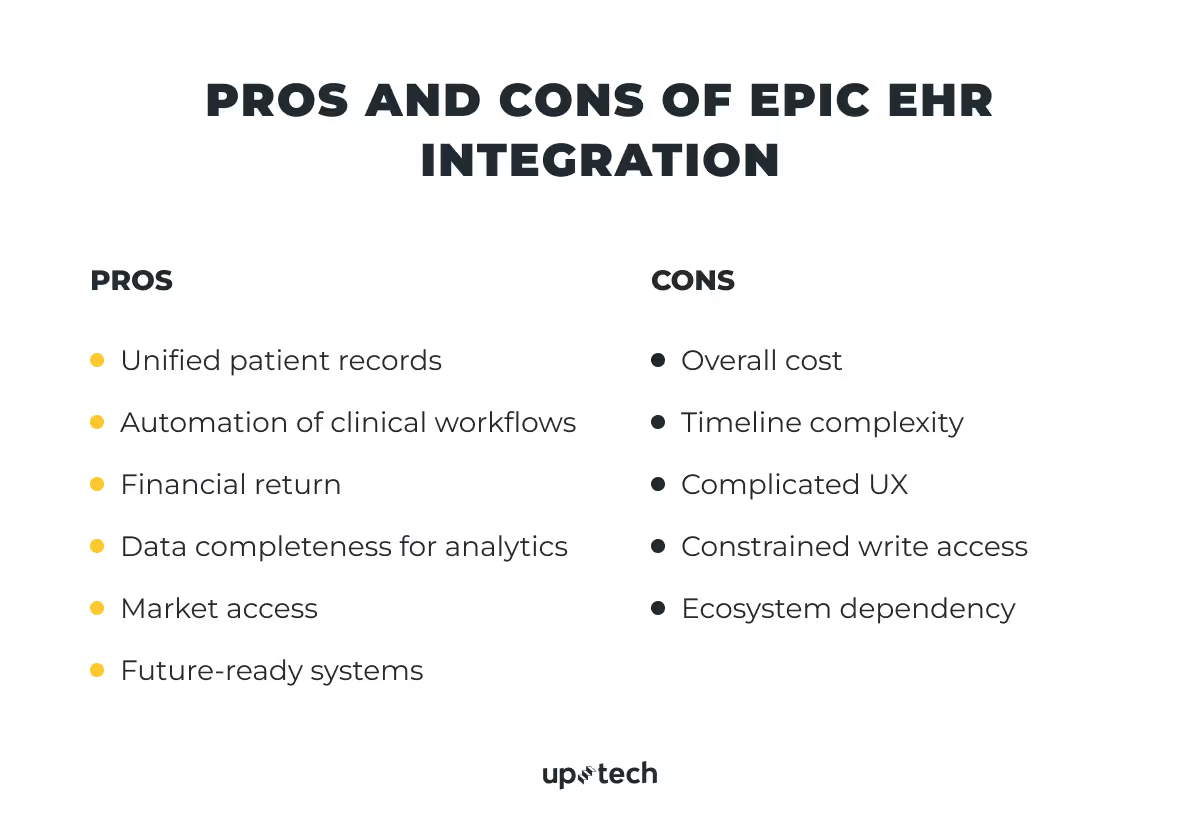
Unified patient records
80% of serious medical errors stem from communication gaps between care teams. Epic EHR integration puts every patient's complete history (medications, allergies, labs, notes) into one real-time record, reducing errors and liability while improving outcomes.
The impact: fewer medical errors, better patient outcomes, stronger reputation, and lower liability risk
Clinical workflow automation
When Epic isn't connected to other systems, staff manually transfer data between platforms. A lab result comes in, and a nurse has to log into the lab system, find the result, type it into Epic, and then notify the doctor. Three extra steps, three chances for error.
Integration automates this entirely. Data moves between Epic and every connected system automatically.
The impact: no manual data entry, no delays between systems, fewer errors at every step.
Financial return
According to HFMA, U.S. hospitals lose 3–5% of revenue annually to billing inefficiencies, and most claim denials stem from preventable issues like missing data or incorrect codes. Epic EHR integration closes both gaps by capturing the right information the first time. For example, organizations using Epic's Penny AI billing tool have seen a 20%+ reduction in coding-related denials.
The impact: more revenue captured, faster reimbursement, and protected performance-based funding.
Data completeness for analytics
Siloed systems keep patterns invisible. You can't find high-risk patients or see what works when data is spread across different platforms. This leaves hospitals making million-dollar choices based on incomplete information.
Integration fixes this. With unified data, tools like Epic's Healthy Planet module can surface insights across clinical, claims, and social determinants data, enabling earlier intervention, smarter resource allocation, and evidence-based care improvements.
The impact: readmission prevention, smarter resource allocation, evidence-based protocol improvements, and earlier intervention.
Market access
Epic holds records for 325 million Americans, making it the dominant platform in U.S. healthcare. For most large health systems, the first question about any new digital health tool is: "Does it integrate with Epic?" If the answer is no, the conversation usually ends there. Tools that don't connect to where patient data lives create extra work and rarely get adopted.
Integration removes that barrier, opening the door to the majority of the U.S. hospital market.
The impact: shorter sales cycles, credibility by association, and future-proofing.
Future-ready systems
According to NVIDIA's State of AI Healthcare and Life Sciences survey, 70% of healthcare organizations are now actively using AI. Every one of those tools runs on the same foundation: clean, structured data flowing reliably between systems.
Epic integration creates the clean, connected data infrastructure that modern tools need. When a new tool arrives and is implemented, it works straight away instead of requiring months of technical setup.
The impact: faster AI adoption, long-term savings at scale, and a foundation for precision medicine.
What Are the Cons of Epic Integration?
Epic integration can unlock a lot of value, but it comes with real constraints. Most of them are not obvious at the start and tend to surface only once the project is underway. Understanding them early helps set realistic expectations for time, cost, and effort.
Overall cost
Epic integration is expensive and resource-intensive. Organizations typically underestimate their total Epic investment by 40–60%. Every customization added during implementation must be maintained, retested, and rebuilt for each future upgrade. This makes scope discipline a key cost control.
Epic pricing isn’t a single fee — it’s a layered model with multiple recurring components that scale with organization size.
- Physicians — $5,000–$7,000 per user/year for those actively documenting care, writing orders, and reviewing records.
- Clinical staff — $1,200-$3,000 per user/year for nurses, pharmacists, lab techs, and anyone else who touches the system daily.
- Specialty modules — Epic is not one system but a platform of separately licensed add-ons — Beacon (oncology), Radiant (radiology), Willow (pharmacy), and more. Pricing is negotiated per contract and not published, but module costs run into the hundreds of thousands for large systems. Most institutions deploy five or more.
- Annual maintenance — roughly 20% of the initial license cost, every year, forever. A hospital that spent $3M on licenses owes ~$600,000/year just to keep the system running. This fee is permanent and non-negotiable — and one of the most commonly missed items in budget planning.
Timeline complexity
Epic implementations are lengthy by default: 12–18 months for mid-size practices, 18–24 months for large hospitals, and up to 36 months for enterprise multi-site systems. These timelines frequently slip, driven by scope creep, staff turnover mid-project, and slow security reviews and access approvals from the hospital's Epic team.
Complicated UX
Epic's navigation logic dates back to the 1990s, built for trained specialists at desktops rather than busy clinicians. Simple tasks like booking an appointment or documenting a note require clicking through multiple screens and sub-menus. Customization adds to the problem: hospitals configure Epic to match their workflows, but inconsistent setups mean staff moving between departments must relearn navigation each time.
Constrained write access
Epic's FHIR APIs are largely read-focused. Pulling patient data is straightforward once access is granted, but writing back requires separate permissions, stricter validation, and formal approval from the hospital's Epic team and often its compliance committee. This catches integration teams off guard: a team can be reading data within weeks, but may wait months for write permissions. Most start read-only and treat write access as a later negotiation. Some never get it at all.
Ecosystem dependency
Building on Epic means operating within its boundaries. Epic controls what external systems can do, and those limits are structural. Clinical workflows cannot be bypassed: mandatory physician review steps must be worked around, not through, and no integration can shortcut an order sign-off.
Write-back is limited to specific FHIR resource types, and write-capable integrations require separate hospital approval. For certain order types like medications, referrals, and diagnostics, external apps can surface recommendations or pre-fill fields, but the final action must be triggered by a credentialed user inside Epic.
How to Evaluate If Epic Integration is Suitable For You?
Epic integration is a high-cost, high-effort decision. It only makes sense when the problem is clear, and the impact justifies the investment. Before committing, it’s worth validating a few things upfront.
Integration readiness table
A single “reconsider” answer doesn’t rule out the project, but it shows where failure is most likely. Fix those gaps first. If you can’t make a strong case for problem clarity and ROI, pause there — everything else depends on knowing the goal and how success will be measured.
If you land in “reconsider” on more than two criteria, the organization likely isn’t ready. That’s valuable to know. In some cases, a lighter solution like a middleware layer makes more sense than a full Epic integration.
Epic is not the right answer for every problem. If this evaluation raises more questions than it answers, go back to the use cases above and test whether the conditions for a strong case actually exist in your organization before moving forward.
When Should You Consider Epic Integration?
Epic EHR integration is a significant investment and should be driven by a clearly defined problem. Here are a few situations where it makes sense.
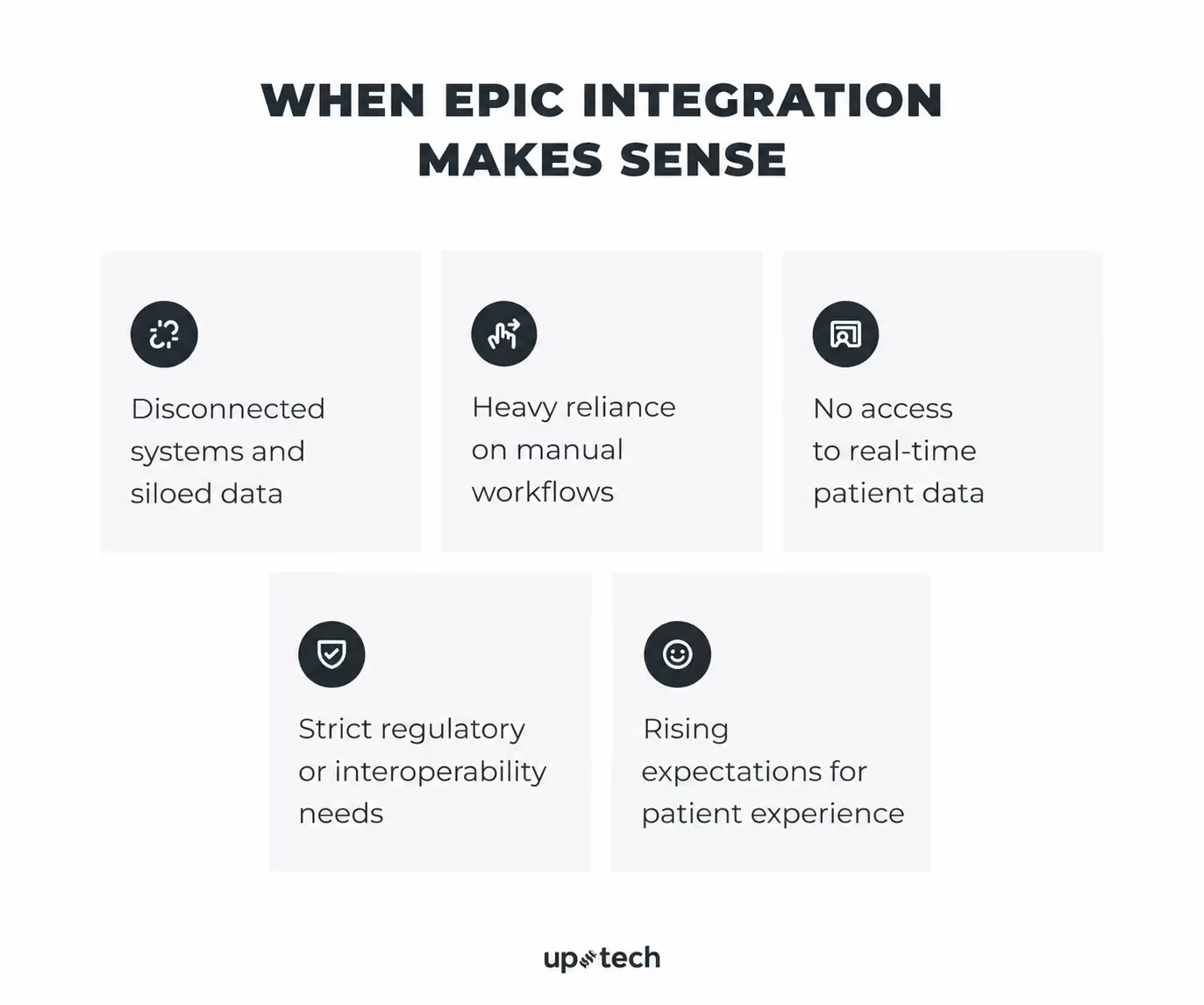
Fragmented systems and data silos
The problem: Staff manually transfer patient data between a lab system, billing tool, scheduling app, and referral portal. No single view of the patient exists.
Baseline state: Patient data lives across multiple systems (lab, billing, scheduling, referrals). Staff manually reconcile records, and no single, up-to-date patient view exists.
How Epic helps: Creates a unified patient record: every data point visible in one place, updated automatically, no manual handoffs.
Integrations to consider: Epic Beaker (labs and diagnostics), Epic Care Everywhere / CareLink (care coordination), Epic Healthy Planet / Clarity & Caboodle (population health)
Manual workflows and operational inefficiencies
The problem: Staff spend significant time completing repetitive administrative steps that could be automated: sending referrals, starting prior authorizations, updating billing information, scheduling follow-ups, or routing tasks to the right team.
Baseline state: Workflows rely on manual steps: phone calls, faxes, reminders, and duplicate data entry to move processes forward.
How Epic helps: Epic integration can trigger the next step automatically based on clinical events. For example, a referral can start when a provider places an order, billing can be updated after documentation is completed, or a follow-up task can be created after discharge.
Integrations to consider: Epic Payer Platform / Bridges for prior authorization, Epic Resolute for billing, Epic OpTime / Cadence for scheduling, Epic SmartForms / DAX for documentation support.
Need for real-time data access
The problem: A physician adjusting a medication dose sees lab results from hours ago. A care manager doesn't know that a high-risk patient was admitted this morning.
Baseline state: Clinical data is updated via batch processes or delayed syncs. Providers often work with outdated information.
How Epic helps: FHIR R4 APIs provide on-demand access to current medications, labs, vitals, and allergies. Subscription framework pushes updates instantly when something changes.
Integrations to consider: Epic FHIR R4 APIs, Epic CDS Hooks / Compass (clinical decision support), Epic Beaker (labs), Epic Cupid (cardiology), Epic Haiku & Canto (mobile access)
Regulatory and interoperability requirements
The problem: Organization is subject to CMS interoperability rules, participates in value-based care contracts, or exchanges data with payers and external providers.
Baseline state: Data exchange relies on PDFs, manual exports, or non-standard formats.
How Epic helps: Builds on FHIR R4 APIs aligned with USCDI standards — exposes the right data, in the right format, to the right parties, automatically.
Integrations to consider: Epic Payer Platform / FHIR R4 APIs (payer exchange), Epic Care Everywhere / Share Everywhere (information blocking), Epic Healthy Planet / Clarity & Caboodle (quality reporting)
Patient experience expectations
The problem: Patients deal with multiple logins, outdated information, lab results delayed days after availability, and care teams that can't see each other's notes.
Baseline state: Patient interactions are fragmented across systems — multiple logins, delayed results, limited visibility into care.
How Epic helps: MyChart connected to the live record lets patients schedule, view results, manage prescriptions, and message their care team in one continuous experience. Clinical events trigger proactive outreach automatically — discharge instructions, overdue screenings, new results — without manual coordination.
Integrations to consider: Epic MyChart / MyChart Bedside (patient portal), Epic Cheers (CRM & outreach), Epic Happy Together, Epic Transitions of Care (post-discharge)
Epic EHR Integration Alternatives to Consider
Epic is often the right answer, but not always the first one. Many teams move to Epic too early and take on complexity before they validate the value of what they are building.
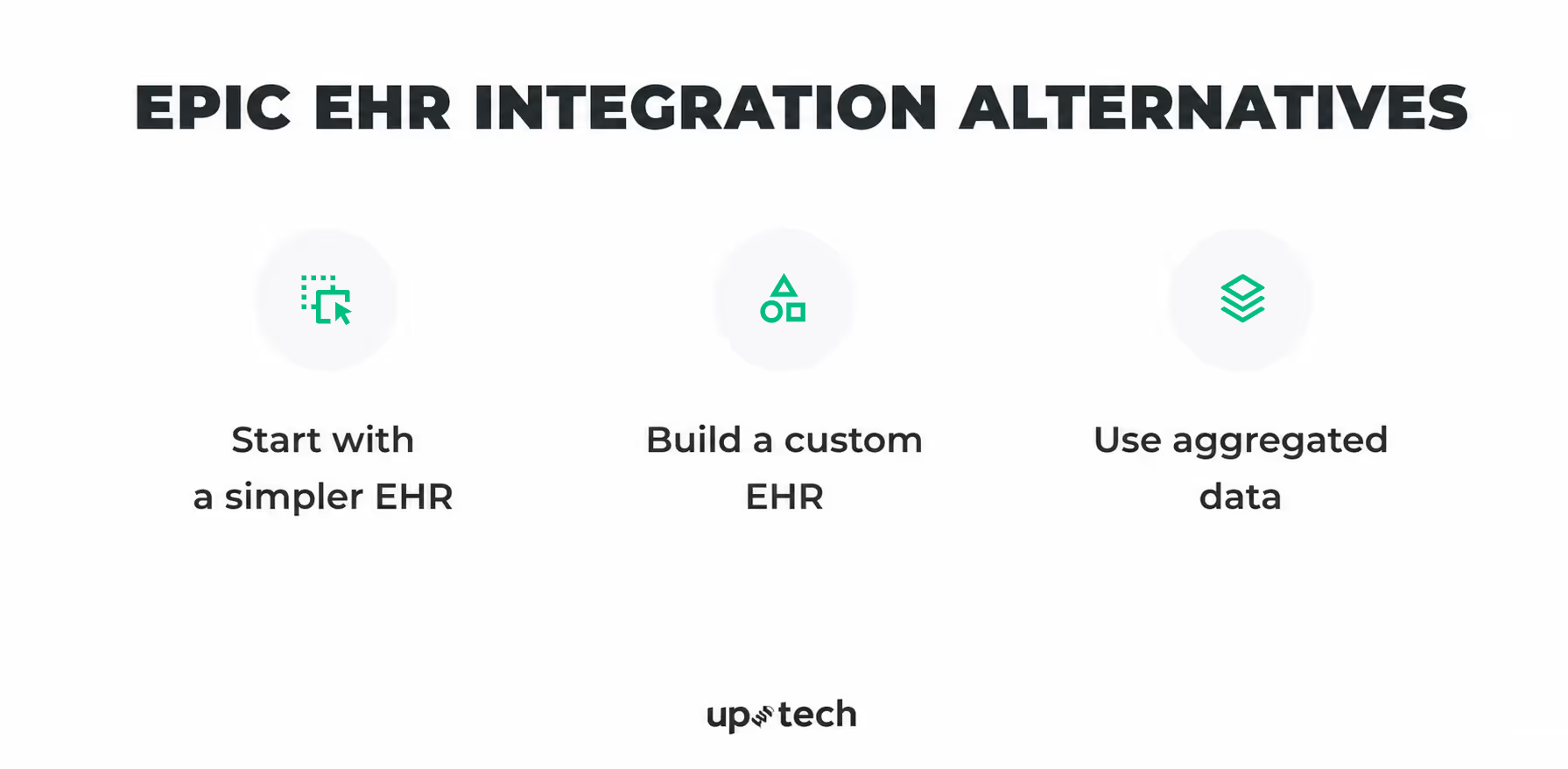
Start with a simpler EHR
Platforms like athenahealth or eClinicalWorks have lower integration barriers, simpler approval processes, and faster paths to production than Epic. You can test whether your solution improves a workflow, delivers clinical value, or drives adoption without waiting months for certification.
Pros: faster time to production, lower upfront cost, easier iteration while the product is still evolving.
Cons: smaller market footprint, limited interoperability with large health systems, likely requires a rebuild when moving to Epic later.
Use this when you are still validating product-market fit. Once value is proven through usage, outcomes, or revenue impact, moving to Epic becomes a scaling decision rather than a risk.
Build a custom EHR
A purpose-built system gives you full control over the data model, workflows, and user experience. Standard EHRs, including Epic, are built for broad clinical use. In highly specialized areas like behavioral health, precision medicine, or complex clinical trials, that generality becomes a constraint.
Pros: workflows built around how your clinicians actually work, not how a general-purpose EHR expects them to; data modeled exactly as your specialty requires; faster iteration without dependency on Epic's upgrade cycles; the interface itself can become a competitive differentiator.
Cons: higher upfront cost, full ownership of HIPAA compliance, ONC certification, security architecture, and FHIR conformance if data exchange is required.
With the right partner, much of the custom healthcare software development overhead can be handled for you. An experienced healthcare software vendor can take care of compliance, security architecture, and interoperability, allowing your team to stay focused on clinical workflows and product decisions that truly differentiate your solution.
Uptech is a software development company with extensive experience building healthcare solutions that comply with industry regulations.
If your core value depends on workflows that standard systems don’t support well, a custom EHR may be the better starting point. Contact us for a free consultation.
Use aggregated data instead of direct integration
Not every use case requires real-time, patient-level integration. Epic's Cosmos dataset and third-party aggregators like Datavant provide access to large-scale, de-identified clinical data across multiple health systems, already normalized and significantly easier to work with than raw EHR data.
Pros: faster to access, cheaper to maintain, no certification or per-site approval process required.
Cons: no real-time updates, no full patient-level context tied to a specific system, limited granularity for use cases that depend on the current clinical state.
If you are training predictive models, analyzing population health trends, or benchmarking performance, aggregated data is often sufficient, and the integration overhead is unnecessary.
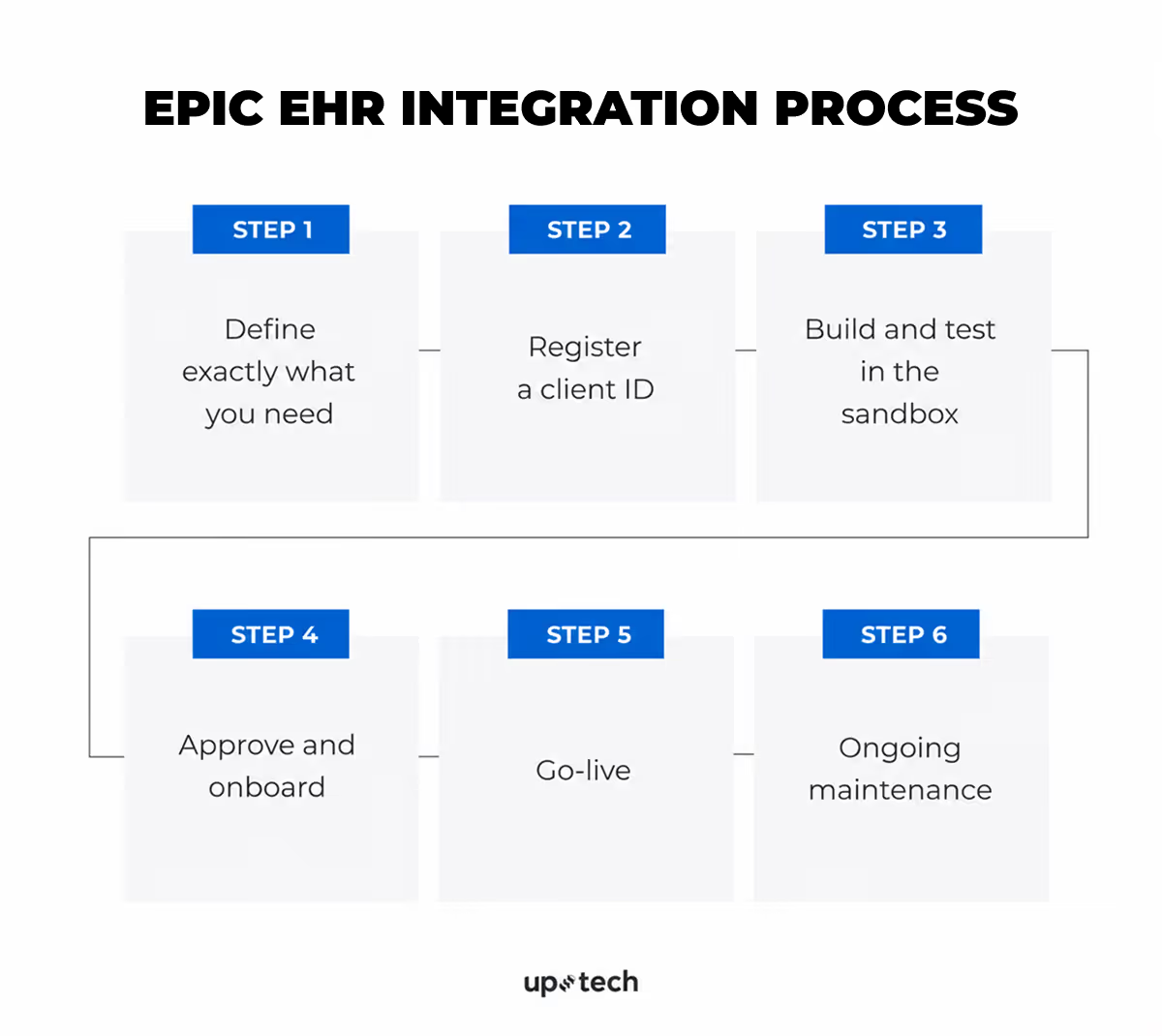
Epic EHR Integration Process
So how does integration actually work in practice? Below is a step-by-step breakdown of what your organization needs to do, in what order, and where the complexity usually appears.
Throughout the process, three or four parties are typically involved:
- Hospital management — makes decisions, approvals, budgeting, vendor selection, and sign-offs at key stages. No technical knowledge required, but timely action is critical.
- Technical delivery team — The party responsible for configuring, building, testing, securing, and maintaining the integration. Depending on the organization, this may be the hospital’s internal IT team (including integration specialists, security personnel, and Epic analysts), an external software development or healthcare IT vendor, or a combination of both. They typically own day-to-day technical execution throughout the project.
- Epic — the platform provider that supplies documentation, APIs, sandbox environments, client IDs, and certification pathways. Epic representatives are not usually involved in day-to-day implementation and are engaged mainly for platform guidance, program participation, or specific support needs.
Step 1: Define exactly what you need
Responsible: the management team and the technical delivery team
Before any technical work begins, the integration must be clearly scoped. This phase belongs to both hospital management and the technical delivery team. Management owns the what and why. The technical side owns the how.
What data do you need?
Management defines the clinical, operational, or business problem that the integration should solve and what data is required. The technical delivery team then confirms whether that data is available in the organization’s Epic environment.
Some data can be accessed through Epic interoperability options such as FHIR APIs. Other data may depend on the hospital’s Epic version, licensed modules, local configuration, custom fields, or access policies. Some requested data may require additional approval or may not be available through the planned method.
In which direction does data flow?
Reading data from Epic and writing data back to Epic are different integration models.
Management decides whether Epic is the source of data, the destination, or both at each workflow step. The technical team converts that into technical requirements.
Read access means retrieving data from Epic, such as demographics, appointments, medications, allergies, lab results, or encounters.
Write access means sending data into Epic, such as documentation, questionnaire responses, scheduling updates, orders, results, or workflow status changes. Write scenarios usually require tighter permissions, stronger validation, and more testing because they can affect records or workflows.
Common planning mistake
Many projects begin as read-focused integrations, then discover during development that a critical workflow also needs write-back capability.
That can change the timeline, approvals, security review, technical design, and testing scope. This should be confirmed during planning, not midway through development.
How to determine read vs write
Review each workflow step and ask:
Does this step only consume data from Epic, or does it create something that must be stored or acted on in Epic?
- If Epic only provides data, read access is likely sufficient.
- If the workflow creates information that must live in Epic, write access is required.
What triggers the data exchange?
Management selects the operating model. Each model has different costs, latency, and maintenance implications.
Which Epic modules are in scope?
Hospital management defines which workflows the integration must support. The technical team then determines which Epic modules are relevant to those workflows and confirms whether they are active, licensed, and technically available in the environment.
What cannot be done through FHIR?
The technical team should assess whether the integration requirements can be met through the FHIR APIs available in the organization’s Epic environment.
Some use cases may not be fully supported in practice because certain resources are not enabled, required scopes are not approved, functionality depends on local configuration, or the needed workflow is better served through another integration method. In those cases, alternatives such as HL7 interfaces, file feeds, reporting extracts, or other Epic-supported integration options may be required.
These approaches are often more complex, slower to implement, and may involve additional cost, testing, and coordination. Any gaps should be identified early so management can plan the timeline, budget, and approvals realistically.
What does the hospital’s Epic environment look like?
Before final scoping begins, the technical team should assess the local Epic environment, including:
- Which modules are active, and what workflows or data they support
- Which FHIR APIs and other interfaces are enabled in this environment
- How local identifiers are structured (patients, providers, labs, medications, locations)
- What security and access rules govern users, patient populations, and data fields
- Whether local customizations could affect integration behavior
Early compatibility check
Every hospital configures Epic differently. An integration that works at another organization may require adjustments here.
Before development starts, the technical delivery team should evaluate:
- Whether the required Epic modules are active and support the use case
- Whether local data structures align with what the integration expects
- Whether custom workflows require additional handling
- Whether likely access, approval, or security constraints could affect delivery
Where needed, the team references Epic documentation and hospital stakeholders to validate feasibility.
Issues found at this stage can affect scope, timeline, architecture, or cost — which is why they should be surfaced before build begins.
Step 2: Register a client ID
Responsible: Technical team, with hospital management approval before production activation.
The technical team registers the application through Epic’s developer program (commonly via open.epic.com), selects the APIs needed for the integration, and obtains non-production credentials for development and testing. Production access is typically completed later, after required approvals and readiness steps.
The client ID identifies the application and is used for authentication and access control. Requested scopes define what data and actions the application may access.
During this stage, the technical team should review Epic’s developer documentation, implementation requirements, and security guidance.
After registration, the technical delivery team works with the hospital to configure the application for the organization’s Epic environment, including approved scopes, endpoints, authentication settings, and any required local approvals.
Hospital management reviews the requested API access and confirms it aligns with internal policies, privacy obligations, and the intended business use case before production activation.
If the integration is complex or the organization needs additional guidance, Epic may offer optional support programs, such as Vendor Services. These can include sandbox access, technical consultation, and implementation guidance. Availability, pricing, and eligibility can vary, so details should be confirmed directly with Epic.
Step 3: Build and test in the sandbox
The technical delivery team builds the integration and performs early testing in Epic’s available non-production environments, typically using sandbox access, test credentials, and synthetic or sample data.
Epic provides developer testing resources, but direct Epic representative involvement is not usually required at this stage.
Four things to get right before leaving the sandbox
1. Authentication flow
The technical team selects the correct authentication model — for example, user-launched inside Epic, standalone external application, or system-to-system background access — and confirms it is supported in the target hospital environment. Choosing the wrong model can create major rework later.
2. Minimum data access
The technical team requests only the data and permissions the integration actually needs. Hospital management should review requested access before production approval. Excessive scope can slow approvals and increase privacy or compliance concerns.
3. Configurable data mapping
The technical team should treat identifiers, code mappings, and data formats as configurable rather than hardcoded. These often vary across organizations and may need adjustment during rollout.
4. HL7 / interface processing where needed
If the integration uses HL7 v2 or other legacy interfaces, the technical team may use an integration engine such as Mirth Connect or another approved middleware platform rather than building message handling entirely from scratch.
Important limitation
Sandbox testing is for early development and validation only. Final integration testing must happen later in the hospital’s own Epic non-production environment using local configuration, workflows, and approval processes.
Step 4: Approve and onboard
The hospital management team decides whether the integration moves forward. Epic representatives may be consulted in specific technical edge cases, but this is rare. The speed of onboarding depends on how well your internal processes are structured and how quickly approvals are completed.
Legal requirements
Business Associate Agreement (BAA) is a legally required contract under HIPAA between the hospital and any external system that handles patient data on the hospital's behalf. It defines what data can be accessed, how it must be protected, how breaches are handled, and what the liability is. If the integration accesses or transmits patient data, a BAA is required before any live data is accessed. Management should confirm with legal counsel whether the specific integration triggers this requirement.
Management is responsible for initiating, reviewing, and signing the BAA. If the hospital does not have an internal legal team, external healthcare legal counsel should be engaged to review the agreement.
Configuration
Approval provides permission, not operational readiness. Configuration is a separate phase.
Your team handles:
- Data mapping: aligning fields between the hospital’s Epic environment and the connected application or external system. Local medication codes, lab identifiers, diagnosis codes, and facility codes often differ. A single integration can require hundreds of mappings.
- Access permissions: defining which patient populations and data fields the integration can access, based on your internal policies and Epic’s access control framework
- HL7 configuration (if applicable): if the integration relies on HL7 v2 through Epic Bridges rather than FHIR, this requires more time and careful planning than FHIR-based configuration.
Configuration is the technical setup work that makes the integration actually function However, configuration does not mean the integration is ready to use. Testing follows before any clinical staff can access it.
Testing
All testing runs in the non-production Epic environment using synthetic or anonymized data — never against live patient records.
- Standard testing: the team tests core workflows, data exchange, error handling, and system stability. Any defects must be fixed and retested before moving forward. No known critical issues should remain open.
- User acceptance testing: after technical testing passes, clinical staff validate the integration against real workflows in the test environment. They confirm data appears correctly, mappings make sense, and the tool fits day-to-day operations. UAT should follow documented test cases, not informal checks. Issues found often require reconfiguration and retesting.
- Readiness review: once testing is complete and issues are resolved, management and technical teams formally approve go-live readiness. This confirms the integration is safe, functional, and operationally ready.
The outcome: the integration is formally approved for go-live in the production Epic environment, allowing authorized clinical staff to begin using it with live patient data as part of real care workflows.
Step 5: Go-live
Management and the technical team treat this as a controlled clinical event, not a routine deployment.
- Timing: the technical team schedules go-live during staffed hours. Management ensures this does not happen during evenings, weekends, or holidays unless there is no alternative.
- Rollback plan: the technical team defines rollback conditions in advance. Management assigns clear ownership for the go/no-go decision if issues arise.
- Support coverage: a named technical contact must be available continuously for the first 24–48 hours. If an external vendor is involved, management confirms equivalent coverage is contractually required.
- Monitoring: the technical team confirms from the first moment that data is flowing correctly — watching for completeness issues, interface errors, delays, and silent failures where data stops without any visible error.
After go-live, the integration is live and processing real patient data. Clinical staff can now use it in their actual workflows.
Step 6: Ongoing maintenance
Go-live is not the end. Epic operates on a quarterly release cycle, with patches in between. Any update can change API behavior and affect how the integration works. Maintenance is a permanent operational responsibility, not a phase that ends.
Technical team:
- Monitors for silent failures. Integrations can stop delivering data without throwing any visible error. Active monitoring that catches missing data, not just error responses, is essential.
- Tracks Epic release notes. Review them on open.epic.com before each quarterly upgrade and retest any functionality that could be affected.
- Retests after every Epic upgrade. Epic provides a non-production test window before each upgrade. The technical team must use it every time without exception.
- Adapts to API changes. Epic evolves its APIs over time, including version updates and deprecations. The integration should be designed to handle these changes without breaking.
Management:
- Keeps legal documents current. The BAA must remain valid. Allowing it to lapse may suspend the right to access patient data until reinstated.
If the hospital does not have the internal capacity to handle ongoing monitoring, retesting, or compatibility checks, specialized healthcare IT vendors offer Epic integration support with Epic-certified staff.
What Are the Challenges of Epic Integration?
Epic integration unlocks powerful capabilities, but it also comes with real challenges. From technical constraints to long timelines and complex approvals, teams need to be prepared for more than just implementation.
Epic integration can create substantial long-term value, but the harder part is rarely the decision to integrate. It is the execution. Most projects do not fail because Epic lacks capability. They struggle because implementation complexity is underestimated, local environments differ more than expected, or ownership after go-live is unclear.
These are the practical challenges teams most often face during delivery and ongoing operations.
.avif)
Validating data availability in the real environment
Epic may support a data element in theory, but that does not guarantee it is available in the target organization’s environment. Some fields may be unpopulated, restricted by role, stored in custom workflows, or exposed differently than expected.
This often becomes visible only after the solution has already been designed around that data.
How to reduce the risk: validate every required field against the actual Epic environment early, not just public documentation or sandbox assumptions.
Choosing the right integration method
Many teams assume FHIR is the answer to every Epic use case. Often it is the best starting point, but not always the complete one. Some workflows are better served through HL7 feeds, reporting extracts, batch transfers, or other Epic-supported approaches.
Using the wrong method early can create unnecessary limitations or force redesign later.
How to reduce the risk: match the integration method to the workflow, latency needs, write-back requirements, and operational volume before development begins.
Underestimating write-back complexity
Reading data from Epic is often straightforward once access is approved. Writing data back into the system is usually more complex. It may require additional permissions, stronger validation rules, workflow review, and more extensive testing.
Projects frequently begin as read-only initiatives and later discover that a critical workflow also requires write-back.
How to reduce the risk: review each workflow step early and identify where Epic must receive data, not just provide it.
Managing local mappings and identifiers
Epic environments often contain organization-specific identifiers, codes, and naming conventions. Patient classes, provider IDs, facility codes, lab mappings, and workflow labels may differ significantly between sites.
Even technically correct integrations can fail operationally when mappings are incomplete or inaccurate.
How to reduce the risk: treat mappings as a configurable layer, not hardcoded logic.
Aligning with real clinical workflows
A technically successful integration can still fail if it does not fit how care is actually delivered. If the tool adds friction, interrupts timing, creates extra clicks, or surfaces data at the wrong moment, adoption drops quickly.
Clinical staff often work around tools that do not support real workflow pressures.
How to reduce the risk: involve end users early and test against real workflows, not only technical scenarios.
Navigating hospital approval dependencies
Part of the implementation timeline depends on teams outside your direct control. Internal Epic analysts, security reviewers, privacy stakeholders, legal teams, and operational owners may all need to approve or configure pieces of the rollout.
This can slow projects even when the technical build is complete.
How to reduce the risk: build approval cycles into the timeline and assign named owners on both sides.
Keeping pace with Epic changes
Epic evolves over time through regular releases, patches, and environment updates. API behavior, workflows, and dependencies can change, sometimes with downstream impact on integrations.
Stable integrations require active maintenance rather than passive oversight.
How to reduce the risk: review release notes regularly and retest affected functionality during every upgrade cycle.
What Are The Best Practices for Epic Integration?
These are the patterns that separate integrations that run reliably for years from ones that become chronic operational liabilities. They're not theoretical — they're what consistently makes the difference in production.
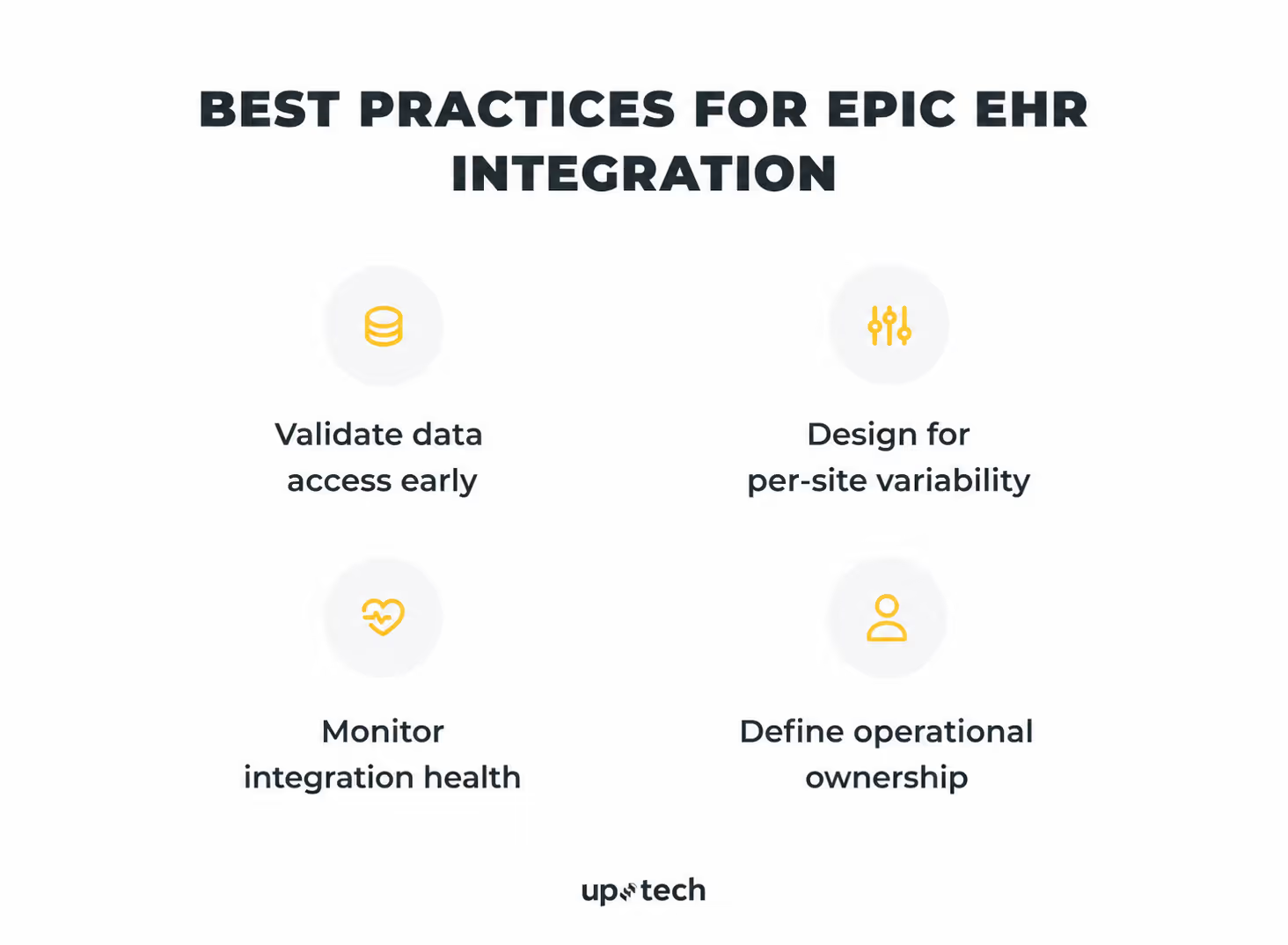
Validate data access early
Do not rely solely on documentation or sandbox assumptions when planning an Epic integration. Public documentation may describe what Epic supports in general, but each health system’s environment is configured differently. A required field may be unavailable, unpopulated, restricted, or exposed through a different interface than expected.
Before finalizing the scope, validate every data element your solution depends on in the target environment.
For each required field, confirm:
- the data exists and is populated in real records
- the correct access method is available (such as FHIR, HL7, Interconnect, or reporting extracts)
- the necessary permissions, scopes, and credentials can be approved
- the data quality is reliable enough for the intended workflow
Early validation helps prevent redesign, avoids delays during implementation, and reduces the risk of discovering critical data gaps late in the project.
Design for per-site variability
No two Epic environments are identical. Build a configuration layer that captures each health system's Epic version, enabled FHIR scopes, endpoint URLs, custom field mappings, and known behavioral quirks. This adds overhead upfront. It saves weeks per new customer as you scale — and it prevents the frustrating pattern of an integration that passes certification, works at Site A, and then breaks at Site B for reasons you have to reverse-engineer from scratch.
For each health system, maintain a structured, version-controlled configuration record covering:
- Epic version and update cadence
- Which FHIR scopes and API pathways are actually enabled
- Endpoint URLs and authentication details
- Local value set mappings — patient class codes, encounter types, flowsheet IDs that differ from Epic defaults
- Known behavioral quirks discovered in testing are documented explicitly rather than left in someone's memory
Monitor integration health
The difference between a mature integration and a fragile one often is whether you know something is wrong before a clinician does.
There are two ways to find out about failures.
The first is an automated alert that fires when message volume drops, error rates spike, or API latency climbs past a threshold. Your on-call engineer is looking at a dashboard before anyone in the health system has noticed anything unusual.
The second is a help desk ticket from a frustrated nurse who hasn't been able to pull patient data for the last two hours.
Alerts should be specific enough to direct action, not just signal that something is wrong. "Error rate elevated" is not sufficient; "Authentication failures on Site B Interconnect endpoint exceeding 15% in the last 10 minutes" is actionable. The engineer who receives it should know immediately where to look and what to check first.
What to monitor:
- Message volume: sudden drops are often more informative than spikes. A feed that goes quiet usually means something upstream has broken, not that activity has slowed
- Error rates by type: separate authentication failures, validation errors, and timeout rates. A spike in 401s means something different than a spike in 422s, and conflating them slows diagnosis
- Queue depths: a growing queue that isn't clearing is an early warning of a processing bottleneck before it becomes a backlog that takes hours to drain
- API response times: latency degradation on Epic's Interconnect often precedes outright failures, and gives you time to act before clinical workflows are visibly affected
- End-to-end message latency: track how long it takes from an event firing in Epic to your application processing it. SLA breaches here are often the first sign of a configuration problem at the health system level
Define operational ownership
Technical problems during an active clinical workflow reveal every gap in your operational structure simultaneously. The alert fires, nobody is quite sure who owns what, and the first ten minutes of the incident are spent on org chart navigation rather than diagnosis. That's a planning failure, not a people problem.
The questions that need written answers before go-live:
Not approximate answers. Named, agreed-upon, documented answers:
- Who monitors integration health day-to-day?
- Who gets alerted when something breaks at 2 am, and through what channel?
- Who owns regression testing before each Epic upgrade — on your side and the health system's?
- Who is the named contact at the health system when the problem is on their end?
- What's the escalation path if that contact is unavailable?
- What are the SLAs for each failure severity, and who has agreed to them?
Get named owners on both sides before go-live: an Epic analyst responsible for the interface, a clinical informatics contact for workflow issues, and an escalation path into IT leadership for emergencies outside business hours. Confirm these are current after every major staff change. An integration that routes to someone who left six months ago has no owner on one side.
Conclusion
Epic integration done well is one of the most durable investments a healthcare organization or health tech company can make. It creates direct access to the most complete clinical dataset in U.S. healthcare, eliminates the manual overhead that comes from disconnected systems, positions digital health products to compete for enterprise customers, and builds infrastructure that compounds in value across every subsequent integration you build on top of it.
Done poorly, it becomes a recurring source of operational disruption, clinical risk, and cost that teams never fully escape.
The difference between those two outcomes is rarely technical. It's whether the team went in with a concrete clinical use case, a realistic understanding of the timeline and approval process, an architecture designed for per-site variability, operational ownership defined before the integration went live, and a clear-eyed understanding of what Epic will and won't allow.
If you're beginning an Epic integration, start earlier than you think you need to, plan for more complexity than your initial scope suggests, and treat go-live as a milestone — not a finish line. The organizations that approach it that way are the ones that end up with something worth building.